

Developer Guide
Use the Developer Guide to find the onboarding process steps, information about authentication methods, and a comprehensive list of the available ABC API endpoints.
Developer Guide
Individual Business Integration Track
Introduction
Individual Business integrations (“IBs”) are direct customer integrations that allow ABC Supply customers to get customer account-specific data and place orders. The following features are available for IBs:
- Customer account details and their respective ABC Supply branch access
- The complete ABC Supply item catalog
- Branch item catalogs and item availability at branches (NOTE: “item availability” is the ability to purchase an item at a given ABC Supply branch; it does not include stock or inventory information)
- Recent and frequent items ordered
- Favorite items from myABCSupply.com
- Branch location information for all ABC Supply branches
- Customer-specific pricing
- Order templates created on myABCSupply.com
- Order submission
- Order status webhook for orders placed through the integration
- Order history and order details
- Invoice history and invoice details (as JSON or PDF response)
- Invoice status webhook for orders placed through the integration
We highly recommend reading the API Overview page before designing and building your integration to ensure your design aligns with ABC Supply’s business and data models and accounts for all workflow scenarios.
Individual Business ABC Customer Account Access
With an IB integration type, your integration is connected to one or more specified ABC Supply customer accounts. During Production access provisioning, you will be asked to provide the your ABC customer account number and a myABCSupply username enrolled with your customer account. If you would like to specify more than one customer account (i.e., you are a private equity company or a joint venture), please reach out to API Support to request additional account access.
Customer account access is verified by the API Support team prior to Production access to protect our customers’ account access and ensure the security of customer data. Additional verification for account authorization may be requested at the time of Production access provisioning.
Individual Business Authentication Method
IBs use Client Credentials for authentication and authorization of their integration. Please see the Individual Business Client Credentials section of Authentication Methods for details. All scopes are available for IBs.
Individual Business Integration Setup
You will need to sign up for our ABC Supply Partner Developer Portal to gain access to our API Sandbox and Production environments. See Developer Portal User Guide to complete the sign-up process, gain access to our API Sandbox environment, and for additional information about requesting Production access once your integration development is complete.
Our Sandbox environment contains customer test accounts. To determine which accounts are available to your integration in the Sandbox environment, please make a request to the Account API Search Accounts endpoint with “accountType” equal to "Ship-To". The available accounts will be returned in the response.
Individual Business Integration Best Practices
Determine Account Access
In Sandbox and Production, you will find ABC customer accounts available to your integration using the Account API. We recommend using Search Accounts endpoint and querying by “accountType” equal to "Ship-To". This will list all Ship-To accounts enrolled in your integration instance, as well as a list of branches to which your Ship-To accounts have access.
NOTE: Because branches determine their own product catalogs and pricing, it is best practice to have the user select a Ship-To account and branch before allowing them to select items and view pricing.
Browse or Search For Products
Once you have account and branch access information, products and their branch availability can be retrieved using Product API. Several endpoints offer optional branch availability data embedding; please see individual endpoint documentation for details.
With the exception of the Get All Items endpoint, the Product API endpoints do not return item data for items that are not available at any branch to which your integrated ABC Supply customer accounts have access. Requests made for these items will return errors in the Product API endpoints.
To ingest the complete ABC Supply product catalog, please use the Get All Items endpoint.
Item Pricing
To retrieve pricing for an item from the Price Items endpoint, the item must be available at a branch to which your ABC Supply customer accounts have access. Pricing will reflect any ABC Supply level or contract pricing active on the Ship-To account provided in the request. To make a pricing request, the following fields are required:
- ABC Supply customer Ship-To account number
- ABC Supply branch number
- item number
- quantity
- unit of measure (optional)
If no unit of measure is provided, the Price Items endpoint will return pricing for the item based on the internal ABC Supply “stocking” unit of measure, which will appear in the response. For additional information about the Price Items endpoint, please refer to the endpoint documentation.
Placing Material Orders
The Place Orders endpoint is used for sending a digital order to ABC Supply. The request will include Ship-To account, branch number, delivery details, and line item details and optional order comments. Please be aware that several validations are completed on the request prior to sending the request to ABC Supply; therefore, it is highly recommended to take note of the possible errors that might occur. A successful order placement will return a 201 ACCEPTED response with a confirmation number in the response body. This is confirmation number can be used to track the order.
When an order is placed, an order acknowledgement email is sent to the designated recipients in myABCSupply.com for the customer account and the order is sent to the designated branch in ABC Supply’s order management system. The order is remains in a "Requested" state until the branch accepts or rejects the order. During this time, the Get Order Details endpoint will not return order information for the order. Once the order is Accepted by the branch, it is submitted to the ERP system and Get Order Details will return a successful response.
To test and validate order placement in our Sandbox environment, please contact API Support. Our team will be able to confirm successful order receipt and provide additional feedback on the placed order to ensure your integration functions optimally.
Order Tracking
Order Status webhooks are the best method for order tracking. Any change to an order will send an Order Status webhook payload to your registered webhook. Please refer to the Order Update Event documentation for additional information.
Order details can be retrieved using the order number or confirmation number of an order from Get Order Details once the order has been accepted by the ABC Supply branch and submitted to the ERP system.
Invoices
Several Invoice endpoints are available to retrieve invoices details in JSON or PDF format. All ABC Supply invoices to which the connected ABC Supply account has access can be retrieved manually through the integration using Invoice GET endpoints.
The Order Invoiced webhook will deliver new invoices with invoice details in JSON format for orders placed through the integration only. Please refer to the Order Invoiced Event documentation for additional information.
Individual Business Production Access
Once you are ready to access our API Production environment, please click the “Request Production Access” button in the Developer Portal. You will be prompted to provide a valid ABC Supply customer account number and myABCSupply.com user email address that has active access to your customer account.
To find your ABC Supply customer account number, please review a recent ABC Supply invoice or log into myABCSupply.com and find the account number at the top-left of the home screen:
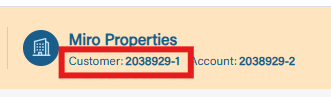
Once your Production Request is sent, ABC Supply will review your request and validate the account number and email provided. If approved, your Production access will be granted and you will receive a notification that your Production access application is now available in the Developer Portal.
If additional account verification is required, ABC Supply will reached out to the requester for futher information.
Production Support
Once your integration is in Production, please contact API Support if you have any issues.
Integration Support
For any integration support requests, please email API Support for guidance.